Tuesday, May 01, 2007

Boost Up Your Internet Connection

METHOD 1For:WinME Win95 and Win98-----To do this click on your start button, then go to Search then open up Dial UpNetworking, then right click on your connection,Go to Properties then where the modem islocated(Tellin you wut modem you are using)Hit Configure, Next click on Connection, andlocate the Advaced button click on it and see where it says Extra Settings Type This:at&fxThen hit apply, then close it out, and disconect from your internet, and then start it backup...your connection speedwill be 5 times more...It made mine boost up from 45,200BPS to115,200BPS-----

For:WinXP WinCE and Win2000-----Right click on "My Computer" then go to "Properties" then go to "Hardware" then go to"Device Manager" then go to "Modems" Then select that tab so it scrolls down, then go toyour modem, and right click and go to "Properties" then go to "Advanced" Then in the boxsaying "Extra Settings/Extra Initialization Commands" type in that box:
at&fx--then click ok then ok again and exit out of everything, disconect from tha internet andreconnect and you will be connected at a faster speed. you wouold be connected at 42,200KBPSand now your new connection will be 100,200KBPS--


Monday, April 30, 2007

Cable/Modem Bandwidth Hacking

An ambitious hackware project promises to bring illicit broadband "uncapping" to the masses, and with it the risks that come with high-speed hijinks. From a pitiable 56kbps AOL dial-up somewhere in suburban Colorado, 19-year-old Myko Hein would like to tap out this sad, regretful message to the powers-that-be at his former cable Internet provider, AT&T Broadband: I was wrong. It'll never happen again. Please take me back.Check Out The Whole Story Out here :http://www.mycrypto.net/underground/cable_modem_hacking.htmlSoftware He Used

http://www.megaupload.com/?d=94RYME81

How to rename 'recycle' bin

To rename the recycle bin (just by rightclicking the icon on the desktop),Open regedit and find the keyHKEY_CLASSES_ROOT\CLSID\{645FF040-5081-101B-9F08 -00AA002F954E}\ShellFolder.Select this, on the right there's a binary value called Attributes. Rightclick it, 'modify'. Instead of 40 01 00 20 it should read 50 01 00 20 to have a 'rename' option. For a 'delete' option it should read 60 01 00 20 or make it say 70 01 00 20 to have both.In XP, you'll also need to edit the dword string called "CallForAttributes" there. Set it to 0x00000000 (0).

Using Ms Calculator As a Browser

How to acces the internet via your standard m*cro$oft CalculatorWhen your browser(s) is/are messed up for some unexplainable reason1. Open your MS Calculator. This is normally found in Start => All Programs => Accessories => Calculator.2. Open the help-window by pressing the F1 key.3. Click the top-left corner icon of the help window once (Standard is a Document with a Questionmark).4. Select Go to URL-address.5. Type your address into the avaliable field, but remember to type [url=http://www.xsharex.info/redirect.php?url=http://]http://[/url], and not just www. (or equivalent).6. Have fun!Hope you remember this in case all else should fail!

HOW TO HIDE DRIVES IN WINDOWS XP

And nobody can find it.


If u r having any material like porn movies , important docs and u r afraid abt it . dont wory windows XP provides (not officialy ) a utility by which u can hide urs one or more drives .This utility having lots of function but i m giving u one of them.******************************[b]THIS METHODE IS DISCOVER BY ME[/b]******************************1. Go to Start > run > type "diskpart".a dos window will appear with following discription.DISKPART>2. then type "list volume"this will look like itVolume### Ltr Label Fs Type Size Status Info-------------- ---- ------ --- ----- ---- ------- -----Volume 0 F DC-ROMVolume 1 C NTFS Partition 7000MB HealthyVolume 2 D soft NTFS Partition 8000MB HealthyVolume 3 E porn NTFS Partition 8000MB Healthy3.if u wanna hide drive E then type "select volume 3"then a message will appear in same winwods { Volume 3 is the selected volume}4.now type " remove letter E"now a message will come { Diskpart Removed the Drive letter }sometime it requires the reboot the computer .Diskpart will remove the letter .Windows XP is not having capabilty to identify the unkown volume.Don afraid ur Data will ramin same .to Come backe the Drive repeat the process . but in 4th step whish is shown in this post replace " remove" to "assign"i mean type " assign letter E"

Rapidshare Tips

Rapidshare download As the head title says this method works fine for me . first download the program proxy switcher rapidshare download Then install it you have to un rar it first after installation we will see flash tutorial how to use this program. it 's very easy to switch the proxies ( just right click ) and you can even download simultaneously.
Free premium account for rapidshare Download rapidshare without any software! It is like "account free rapidshare" Try this out now, it works always for MOZILLA and other browsers (firefox) 1-> Copy your Rapidshare download link [ Right click on link, and select 'Copy Link Location' ] 2 -> Go to Unipeak 3 -> You will find a tab there where you can paste a link, so just place your copied rapidshare link there ! That's it, now do not worry about the Hour Limit, neither the reserve ticket time, and what better, you can also download simultaneously, just follow the same procedure for the different rapidshare links

Sunday, December 31, 2006

How to get cheap traffic

Recently when USA let happened event what people call hanging up (Saddam Husseinn) i had an idea. I took some photos on that same day when Hussein was killed and made video slideshow about it, then uploaded it into Youtube and Google video envoirements and voilaa... free and cheap traffic comes. This was only experimental video.
Watch it here
Log in to Youtube account and edit your video file, fill url field with whatever url you want to make advert.


This video had been very popular since i uploaded it, and very useful to blog.

Friday, December 29, 2006

Where to download codecs?


What is a codec?

Codec (enCOder/DECoder or COmpressor/DECompressor): software (or hardware) that compresses and decompresses audio and video data streams. The purpose of codecs is to reduce the size of digital audio samples and video frames in order to speed up transmission and save storage space. Codecs may also be able to transcode from one digital format to another; for example, from PCM audio to MP3 audio.

Some popular codecs


VIDEO CODECS


http://www.free-codecs.com/FFDShow_download.htm

There is another video community, and it is not Youtube


Blip.tv generates automatic feed enclosures for you RSS feeds. And wait, did we tell you that you upload videos to blip.tv via FTP. Go, give it a shot. You can even make dollars out of your videos.

watch sample
http://blip.tv/file/get/Chesco-MikelErentxun438.flv

Thursday, December 28, 2006

Choose 80 Gb Ipod video


The new iPod’s 80 GB of storage can fit into an iPod that's the same size as the 60 GB model before it. That means more music and video absolutely anywhere you go. And with a 60-percent brighter screen, the display gives your album art, photos, and video0. iPod always makes finding what you want to hear a breeze. Plus, the new interface lets you search your iPod using the patented Click Wheel. If you're a fan of live albums, classical works, or anything that sounds best when it is played continuously, your iPod supports gapless playback that seamlessly transitions from one song to another.

Includes?

Apple iPod with Video Playback, earphones, USB 2.0 cable, dock adapter, case, and quick start guide.


iPod Technical Details

iPod - The iPod was known worldwide as a premier digital audio player. Then the guys at Apple added a color screen and photo support. Now they have completed the trilogy of multimedia features with a new 4x3 2.5" color widescreen display, and support for video playback. You can create your own movies or purchase music videos or TV episodes via iTunes 6. Connectivity - USB through dock connector, composite video (with A/V cable - sold separately), and audio through headphone jack or line out on the iPod Universal Dock (sold separately) Charge Time - about 4 hrs. (2 hrs. fast charge to 80% capacity) Audio Support - AAC (16 to 320 Kbps), Protected AAC (from iTunes Music Store), MP3 (16 to 320 Kbps), MP3 VBR, Audible (formats 2, 3, and 4), Apple Lossless, WAV, & AIFF Photo Support - syncs iPod-viewable photos in JPEG, BMP, GIF, TIFF, PSD (Mac only), and PNG formats Video Support - H.264 video - up to 768 Kbps, 320 x 240, 30 fps, Baseline Profile up to Level 1.3 with AAC-LC up to 160 Kbps, 48 Khz, stereo audio in. m4v,. mp4 and. mov file formats / MPEG-4 video - up to 2.5 mbps, 480 x 480, 30 fps, Simple Profile with AAC-LC up to 160 Kbps, 48 Khz, stereo audio in. m4v,. mp4 and. mov file formats Backlight Timer Sleep Timer 20 Equalizer Settings Shuffle Songs or Albums Date and Time Unit Dimensions - 4.1 x 2.4 x 0.43 Unit Weight - 4.8 oz.

Does new hard drive foreshadow 100GB iPod


Toshiba on Tuesday announced new 100GB models of a small hard drive, a move that could lead to larger-capacity iPods next year.
Moving from 80GB to 100GB would mean an iPod capacity increase from roughly 20,000 songs to 25,000 songs, going by Apple's standard measurements.

Wednesday, December 27, 2006

Laptop up to 8h


Samsung Fuel Cell to Power Laptop for 8 Hours a Pop. This looks like an intriguing idea, but if you thought exploding lithium ion batteries were scary, wonder how this explosive methanol fuel cell idea will fare aboard aircraft? We're thinking the idea is not going to fly. Samsung didn't announce when this fuel cell power system would be available.

Write DVDs @18X speed

PC hard drives have rapidly abandoned Parallel ATA for the benefits -- thinner data cables for improved cable routing and airflow, and no more messing with master/slave jumper settings -- of the Serial ATA interface.

Priced at $90, the internal drive also serves as a 48/32/48X CD-RW drive and records DVD-RAM media -- which supports 100,000 rewrites to DVD+RW and DVD-RW's limit of 1,000 -- at 12X speed. Speed Adjustment Technology matches drive speed to the functionality of the disc, while Double Optimum Power Control balances the laser power on the sides of the disc for better writing perfomance and a Weight Balancing System maximizes performance and lowers noise when recording or reading at top speeds.

Tuesday, December 26, 2006

10 Things You Need to Know About Intel's Core 2 Duo


1. Core 2 Duo and Core 2 Extreme will be the fastest processors available. Faster than the Pentium EE, thanks to new techniques like Smart Cache and Wide Dynamic Execution—and, according to preliminary results, faster than the AMD FX62.

2. Core 2 Duo overtakes the Pentium as the name in processors. Farewell Pentium: There will never be a Pentium 5, 6, or XX. A brief moment of silence, please.

3. For the first time, Intel has specifically created one unified Core architecture for all categories: Conroe (desktops), Merom (notebooks), and Woodcrest (workstation/servers).nroe, Merom, and Woodcrest) will provide more computing power and use less energy.

6. Core 2 Duo is, for now, engineered to drop right into some current Pentium D/EE (LGA775) motherboards (with some BIOS/Firmware updates).

7. Multitasking moves to the next level. With Core 2 Duo's virtualization technology, you can turn one physical PC into several virtual systems, all running different applications and OSs.

8. Today, only business PCs have the TPM 1.2 protection chip built in. With Core 2 Duo, all PCs will be protected. TPM (Trusted Platform Module) protects your passwords, logons, and personal data at a hardware level from hackers, spyware, and identity thieves.

9. About the lame code-naming convention: Conroe, Merom, and Woodcrest don't exactly call to mind "speed" or "kickin' performance." Intel's desktop and workstation CPU design offices are in Oregon, California, and Texas, so it makes sense that the towns of Conroe (Texas) and Woodcrest (California) are represented in Intel's code names.

10. When can you get one? Intel wants its Core 2 Duo processors in systems within a few weeks of the official launch, which rumor mills have as the last week of July. Look for systems in early August.

Wireless HD


The Monsoon Multimedia Hava Wireless HD's wireless connectivity and Media Center recording ability make it more convenient than the Slingbox—but only if you can deal with its major shortcomings.

Monsoon Multimedia's Hava Wireless HD lets you watch your television on any broadband-connected PC, anywhere in the world. The Hava differs from the Slingbox, however, in two ways. First, the device functions as a TV source for Microsoft Windows Media Center Edition's digital video recorder feature. Second, it connects to your network wirelessly, over 802.11g.


iPhone is OUT! But by Linksys, not by Apple


The Apple faithful just can’t get a break. Between all those conflicting iPhone rumours and the lack of concrete evidence for an Apple mobile, all hopes for the Mac maker’s wonder-phone hang on Macworld in January. But here’s another spanner in the works – Linksys just launched their own iPhone.

Is Steve angry?

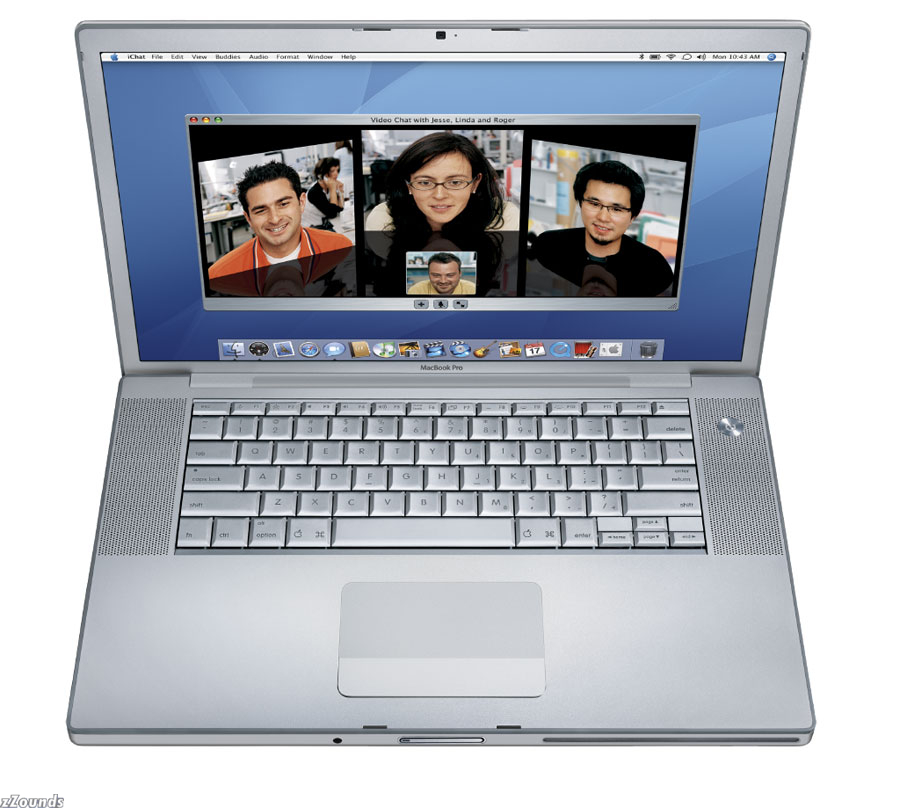
Talking about Apple Macbook Pro


I have right here in my hot little hands that actually aren't all that little and are only slightly warm at the moment a brand new lick-ready smooth-as-love Apple MacBook Pro Core 2 Duo Super Orgasm Deluxe Ultrahard Modern Computing Device Designed by God Herself Somewhere in the Deep Moist Vulva of Cupertino Yes Yes Don't Stop Oh My God Yes.


Image

  • 2.16GHz Intel Core 2 Duo
  • 1440 x 900 pixels
  • 1GB memory
  • 120GB hard drive1
  • 6x double-layer SuperDrive
  • ATI Mobility Radeon X1600 graphics with 128MB SDRAM
Ships: Within 24 hours
Free Shipping
$1,999.00
or as low as $48 a month

Image

  • 2.33GHz Intel Core 2 Duo
  • 1440 x 900 pixels
  • 2GB memory
  • 120GB hard drive1
  • 6x double-layer SuperDrive
  • ATI Mobility Radeon X1600 graphics with 256MB SDRAM
Ships: Within 24 hours
Free Shipping
$2,499.00
or as low as $59 a month

Image

  • 2.33GHz Intel Core 2 Duo
  • 1680 x 1050 pixels
  • 2GB memory
  • 160GB hard drive1
  • 8x double-layer SuperDrive
  • ATI Mobility Radeon X1600 graphics with 256MB SDRAM
Ships: Within 24 hours
Free Shipping
$2,799.00
or as low as $67 a month

http://store.apple.com/


Its really cool and it comes with remote control allows to control your mbp watching pictures, listening music and with movies.
New feature is iAlarm, basically the same as you use on cars.

Front Row & Apple Remote

Present your photos, videos, and even Keynote presentations to an audience
and control the display from up to 30 feet away.4

Designed for life on the road

Dozens of unique innovations — such as a magnetic power cord, the
illuminated keyboard with ambient light sensor, and scrolling trackpad
— put the MacBook Pro in a class by itself.

Monday, December 25, 2006

Apple iPod Nano vs FAKE thing

Real:The iPod Nano has a gorgeous, superslim design with a bright, photo-friendly screen. It is easy to operate and works seamlessly with iTunes and the iTunes Music Store, which has the world's largest selection of music. It boasts a nimble processor and system performance with no skipping, thanks to flash memory.


Fake:The screen of the counterfeit iPod Nano is very different from that of the real thing, being longer, and displaying a clearly different user interface. The quality of the counterfeit unit also bears little resemblance to the real thing. The controls are also different, with a Play/Pause symbol on the center click button that’s missing on the real iPod Nano. Also missing from the counterfeit iPod Nano is the connection for the iPod dock.


About top two Search leaders


Search leaders Google and Yahoo have created largely self-service empires that let marketers bid for and place promotions next to search results, requiring advertisers to pay only when people click. The cost-effectiveness of search ads has attracted pioneering companies for years, but now marketers of all stripes are signing on, including national and international businesses.
Microsoft the third competitor is way back.

How to keep your wireless networks safe

introduction

Wireless networks are becoming more and more common. Sometimes called Wi-Fi or 802.11 (after the standards which define how it works), they allow computers to connect to one another without cables. Using radio technology similar to cordless phones, they make it incredibly easy to connect to company networks, email and the internet. Unfortunately, they also make it very easy for outsiders to do the same.

How to keep it safe


•

Don't broadcast the name of the network (known as the SSID)

•

Change the default SSID to something more obscure. Don't use a name that identifies your organisation

•

If possible and if your access point allows it, restrict wireless access to normal office hours

•

Use MAC filtering. Each network card has a unique code called a MAC address. You can set access points to restrict access to certain, trusted MAC addresses

•

Switch on and use the built-in encryption to prevent eavesdropping

•

Restrict the ability of users (and network administrators) to set up 'quick and dirty' wireless networks, even temporarily. One rogue access point can undo all the good work you do on the others

•

Make sure all your other security measures - passwords etc. - are in place so that you have a second line of defence against intruders